July 2026 Product Updates
By Kelie Wong · 13th July, 2026
Table of Contents
July Product Updates
July marks the year's midpoint, a natural moment to check what's really driving your numbers and tighten up the everyday details of running your store.
This month's updates bring sharper visibility into sales, shipping costs, and search performance, plus smoother tools for your support team and your shoppers.
New Releases
1. Dedicated page to showcase member tier and perks
Customers love their perks, and the Membership Tiers page makes it easier for them to return, check their progress, and see what they can unlock or redeem next.
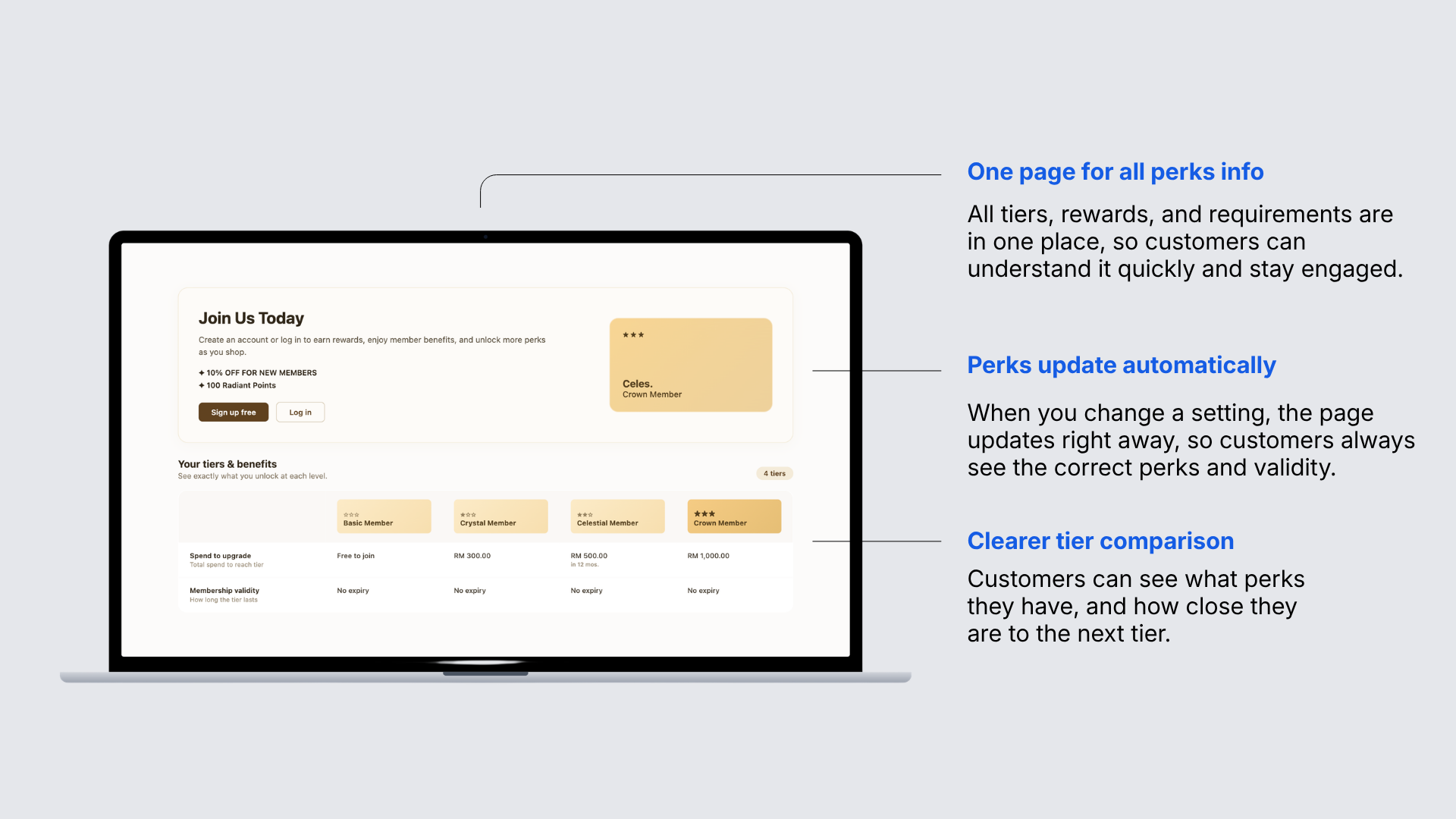
The page is generated automatically based on the tiers and perks you set, with a clear side-by-side comparison showing:
- What customers need to reach or renew each tier
- How long each tier lasts
- The perks unlocked at every level
To set it up, go to Online Store > Navigations > Membership Tiers and click save.
2. Start conversations and assign staff faster in Inbox
Reaching out to a customer first, or getting a conversation to the right teammate, used to mean juggling separate flows inside Inbox.
You can now start a new conversation directly from Inbox with any customer. Available channels (Messenger, Instagram, WhatsApp Business, or Live Chat) appear automatically based on that customer's contact history.
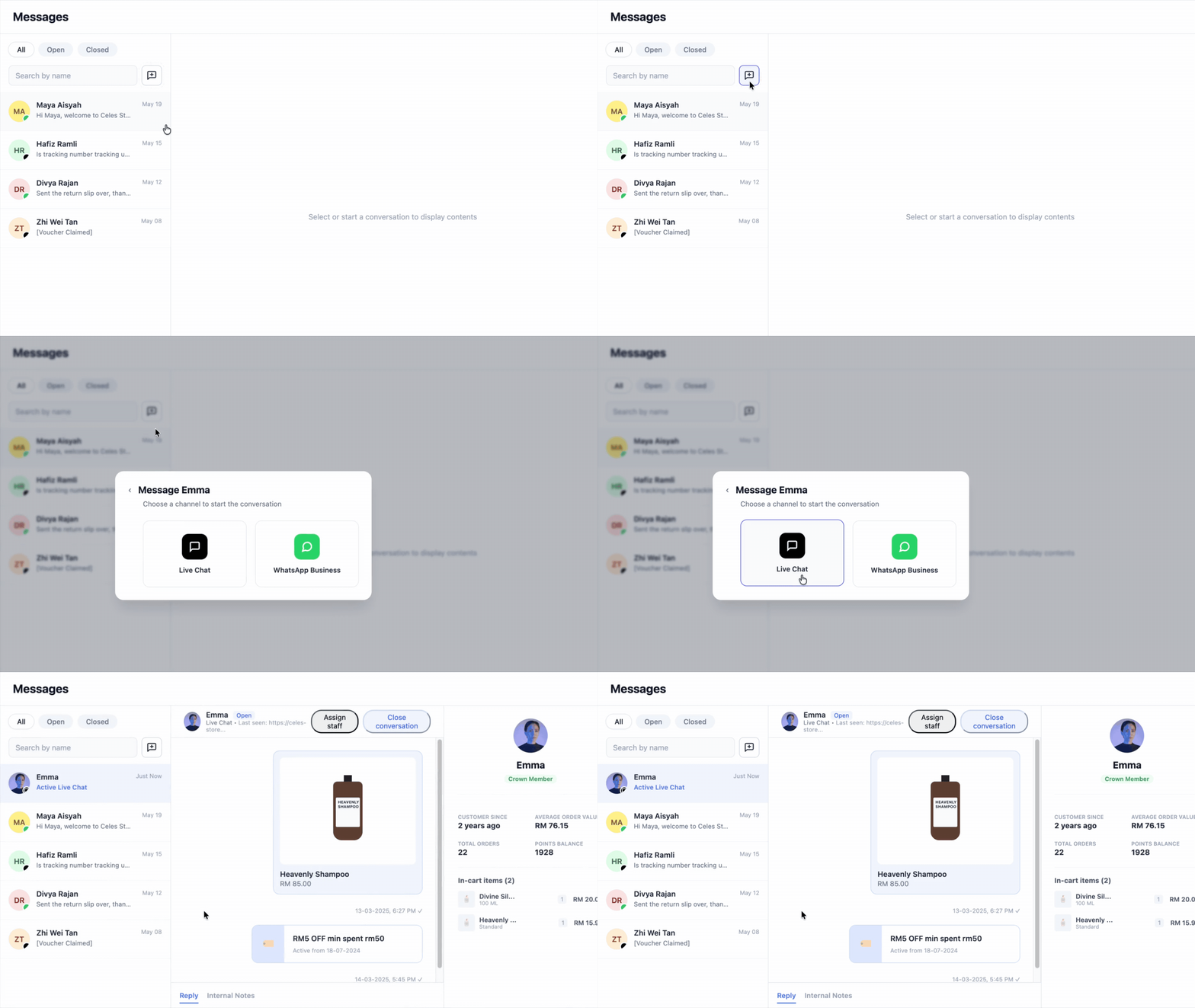
If a conversation already exists, EasyStore reopens it instead of creating a duplicate. Conversations can also be assigned or reassigned to a specific staff member right from the chat header, with the assignment visible in both the header and the conversation list.
If you're managing high volumes across channels, like a live chat and WhatsApp team splitting inquiries by product line, this means faster first responses and clear ownership of every chat.
Note: LINE and Telegram aren't supported for starting new conversations yet.
3. Fulfill urgent Shopee orders in bulk
When ship-by deadlines are buried inside each individual order, it's easy to miss the ones about to expire, especially on high-volume days.
The Shopee order list now shows each order's shipping carrier and ship-by deadline (with time remaining) up front.
You can filter by ship-by date (Today/Tomorrow) or shipping carrier, then select multiple orders to fulfill and print the Airway Bill (AWB) together in one action.
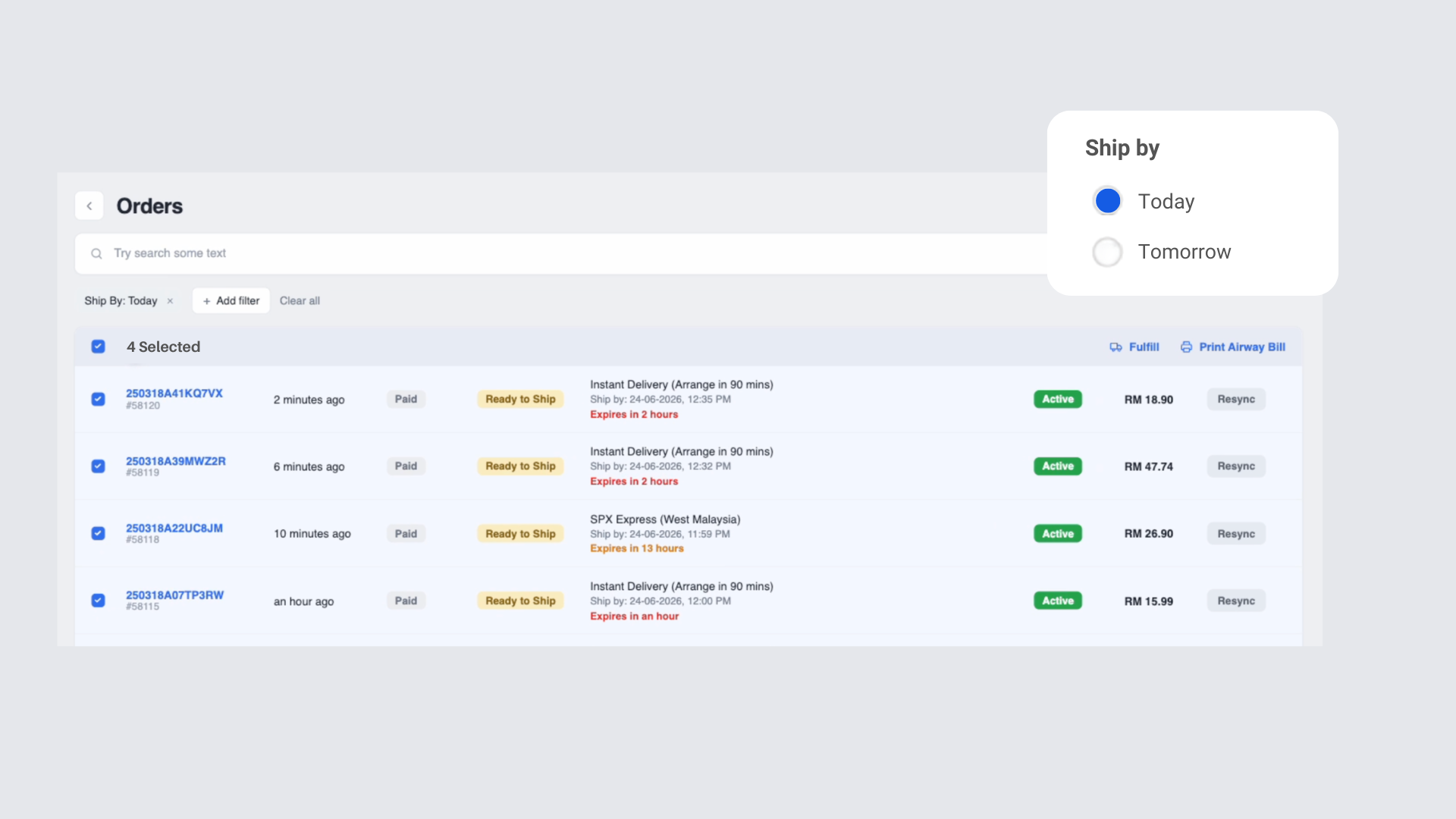
If you're a high-volume Shopee seller running daily promotions with tight dispatch windows, this helps you spot and clear urgent orders quickly instead of opening them one by one.
4. See exactly where your shipping fee at marketplaces go
Shipping costs on Shopee, Lazada, and TikTok Shop involve a few parts, the actual carrier fee, what the buyer pays at checkout, and any subsidy the platform applies.
When these don't add up, seller ends up covering the gap, and until now that gap was invisible.
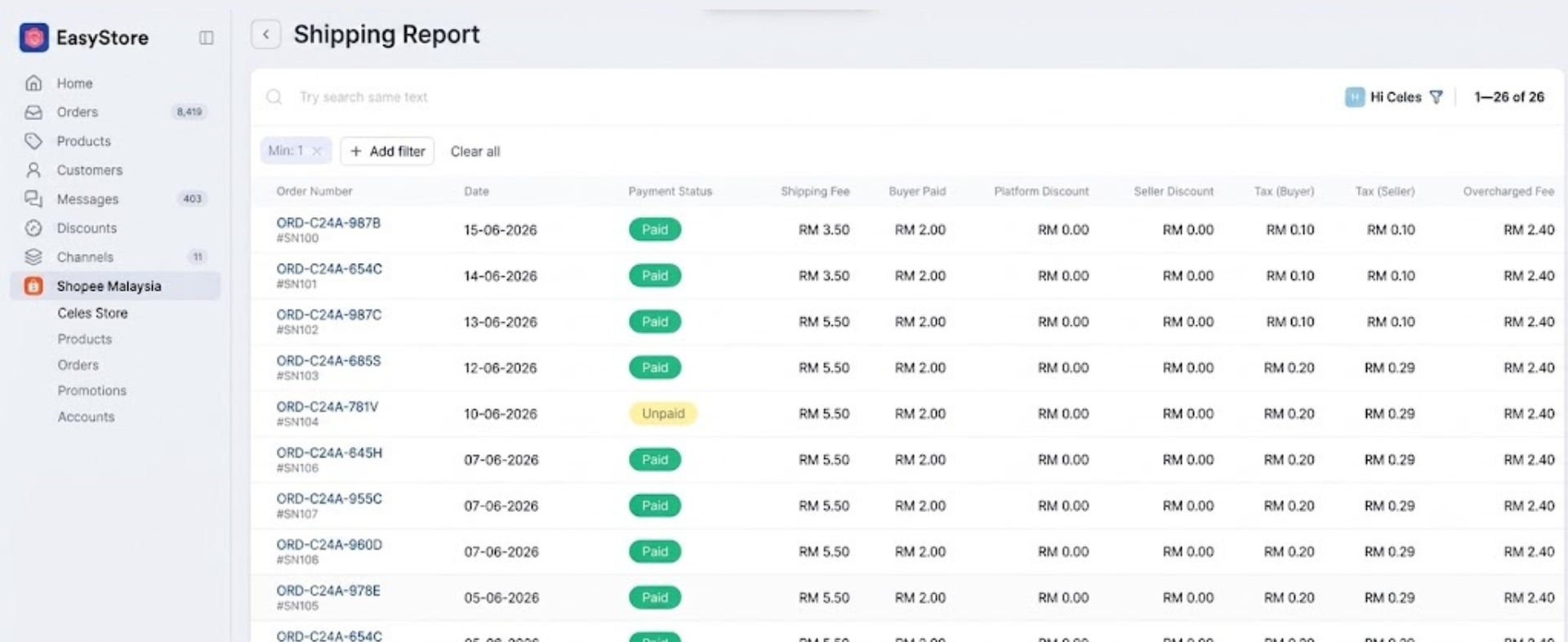
The new Shipping Fee Reconciliation Report breaks this down per order:
- What the carrier actually charged
- What the buyer paid, and what the platform subsidized
- Tax on shipping, split by buyer-side and seller-side
- The EasyStore order ID, so you can trace it back to your own records
You can filter by date range, payment status, or gap amount, and sort by any fee column.
This gives you a clear, order-level view of your true shipping economics instead of an estimate.
Note: for Shopee, the carrier cost is only confirmed after delivery, so very recent orders may briefly show as $0 until that's finalized.
5. Break down sales by collection, brand, or bundle
Knowing your total revenue is one thing. Knowing which collection, brand, or bundle actually earns it is another.
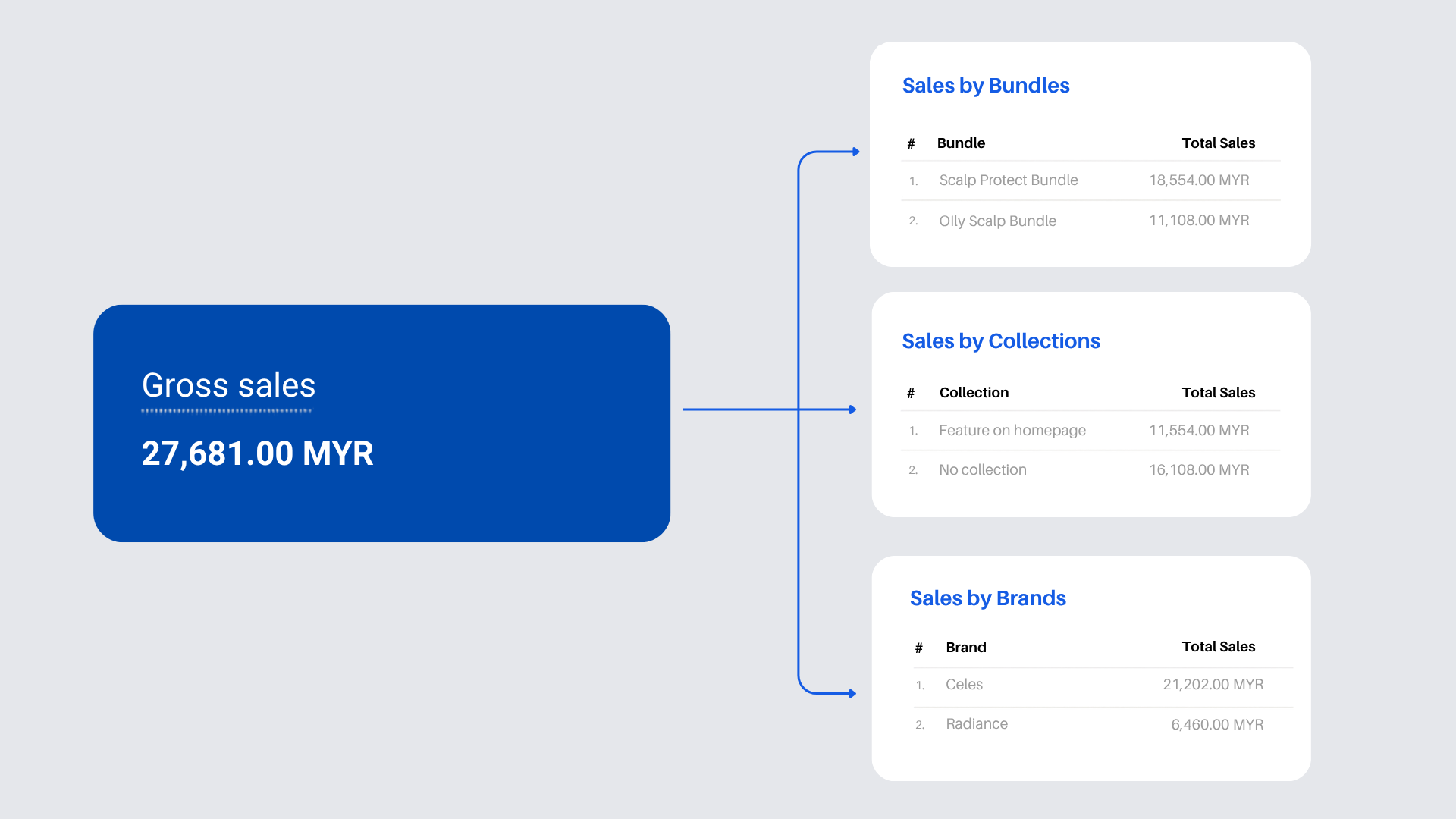
Three new reports are available under Reports:
- Sales by Collections
- Sales by Brands
- Sales by Bundle
Each report can be exported to CSV or Excel for further analysis.
If you run multiple brands or curated collections, a multi-brand fashion retailer deciding which lines to restock or retire, for example, this becomes a data-backed decision.
Enhancements
1. Save your favorite Inbox filters for reuse
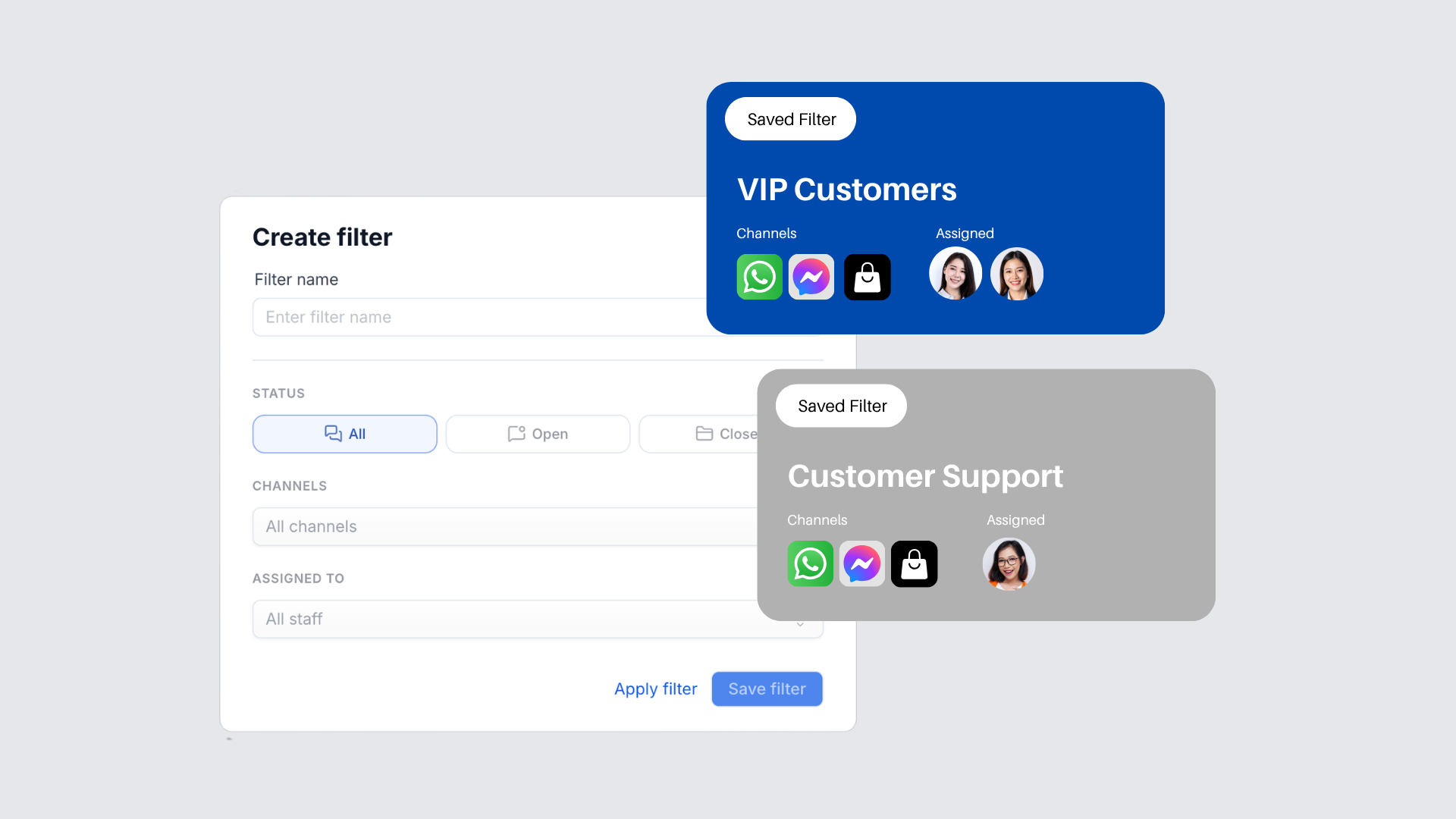
Support agents often re-apply the same filter combination, by status, channel, or staff, every single session.
Inbox conversations can now be filtered by status (All/Open/Closed), channel, and assigned staff, and any combination of filters can be saved with a custom name for one-click reuse from the filter dropdown.
2. Use Chinese product codes in Live sales
If you sell through Facebook and Instagram Live in Chinese-speaking markets, you couldn't use Chinese characters or full-width symbols in product codes, forcing awkward workarounds during livestreams.
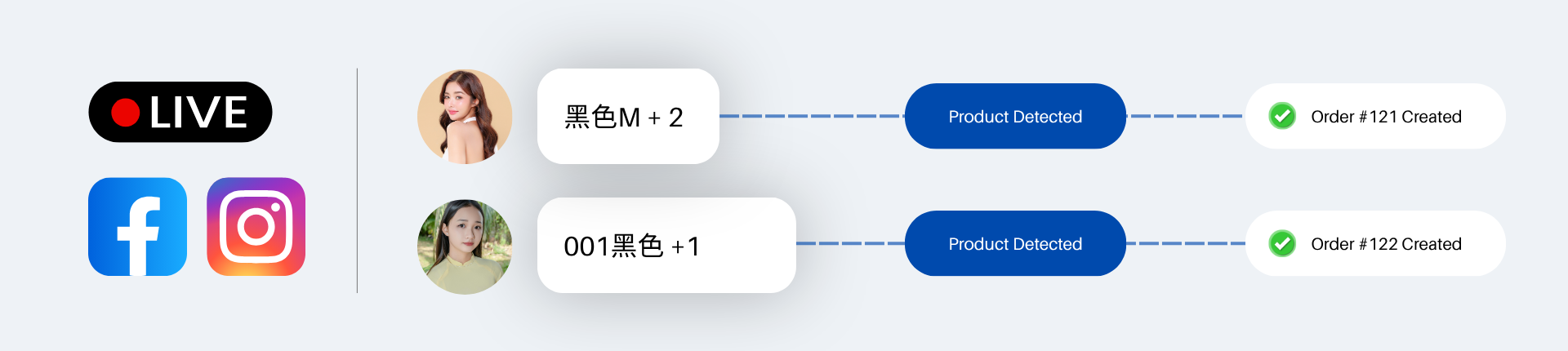
Product codes now accept Chinese characters (e.g. 黑色M, A001黑色) and the full-width "+" typed on Chinese and Japanese keyboards, which now works the same as a regular "+".
This makes for smoother, more natural product-code comments for buyers during Live sessions.
3. Track storage slots in product import and export
For merchants managing inventory across multiple locations or many product variants, capturing exactly where each item is stored hasn't been possible through bulk import or export.
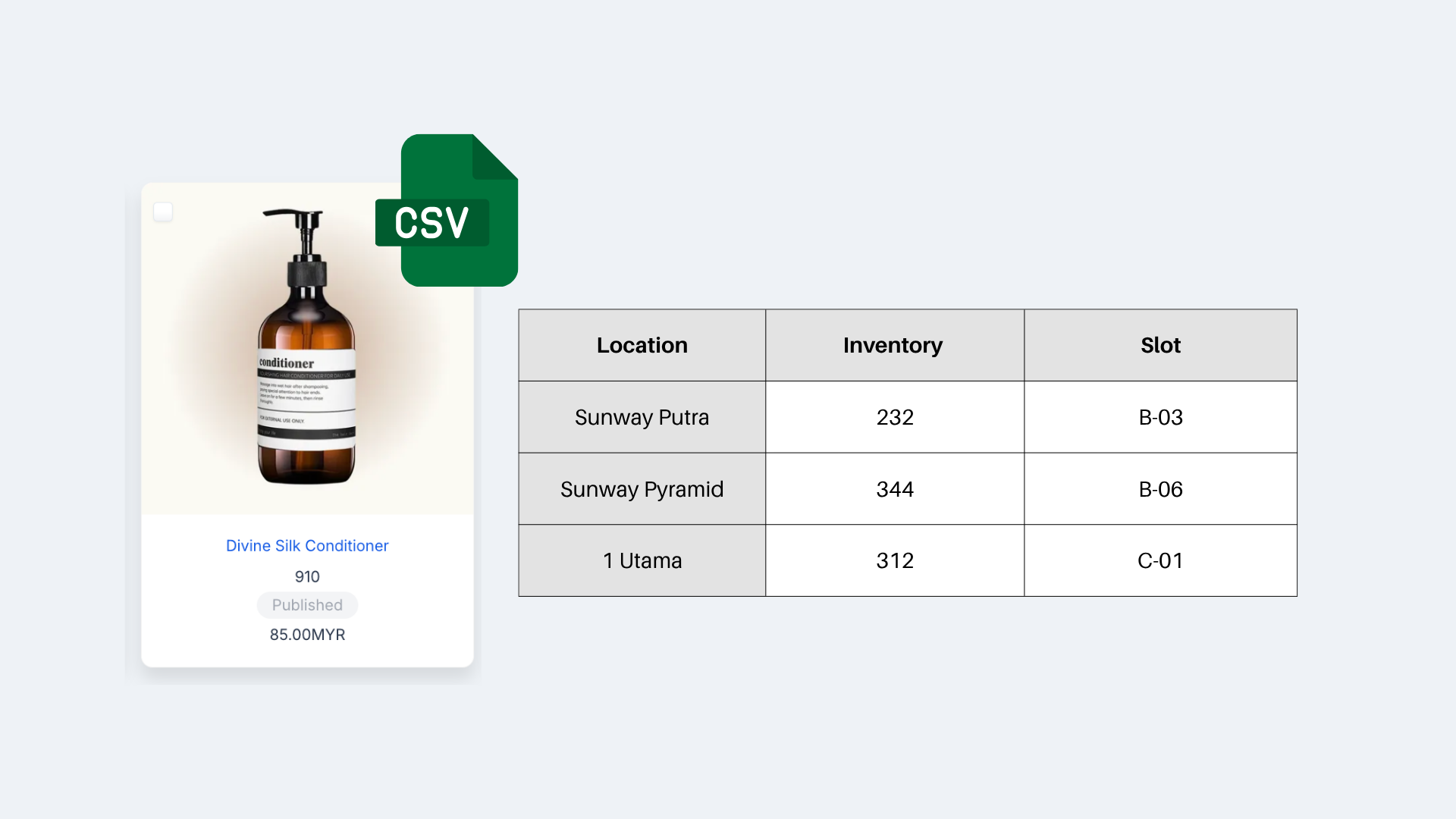
Product import and export now include a slot column:
- Supported down to the multi-location and variant level
- All import templates have been updated with the new slot column
If you run a multi-outlet or warehouse-heavy operation, this means storage locations can be updated in bulk instead of one product at a time.
Faster, more accurate stock organization without manually re-mapping storage locations after every import.
4. Connect iMin receipt printers to your POS
Setting up new POS hardware is smoother when your system already supports the printer you use.
EasyStore POS works with iMin receipt printers, including Swift 1/1 Pro/2/2 Pro, D1, D1 Pro, D1w, D4, D4 Pro, Falcon 1/2, and Swan 2. Just select iMin from your receipt printer settings and choose the SDK version that matches your model.
If you're a retail or multi-outlet merchant, this means one less compatibility headache when setting up or expanding a physical counter.
Note: older M-family devices using SPI mode connections aren't supported.
Make Customers Love Buying from You
EasyStore empower brands to prioritize customers and enhance their experience, creating a unified customer experience (UCX) that customers love.
Over 50,000 brands have grown their businesses by embracing unified customer experiences (UCX) strategy through EasyStore across multiple sales channels, online store, retail outlets, marketplaces, and social media, ensuring consistency in product and service offerings for a seamless shopping journey.
Master Customer Experience in 2026 with our 3 Step Checklist
Customer expectations are on the rise in 2026. Use this checklist to learn 3 essential steps for improving customer interactions and staying ahead.
Download Now