How to Build a High-Converting Online Store: 6 Things to Get Right
By EasyStore Philippines · 7th August, 2026
Table of Contents
Getting people to visit your online store is one thing. Getting them to buy is another.
You can spend money on Facebook or TikTok ads, build a strong social media following, and bring plenty of visitors to your website — but if the store is difficult to browse, doesn't build enough trust, or makes checkout feel complicated, those visitors may never become customers.
So what makes a good high-converting online store?
It isn't just about having a beautiful website. Your store needs to help customers quickly understand what you sell, find the right products, feel confident buying from you, and complete their purchase with as little friction as possible.
Here are six things to get right.
1. Make a Strong First Impression
When someone lands on your store, they should quickly understand what you sell, who it's for, and where to start.
For example, a skincare brand could show:
Skincare Made for Your Everyday Routine
Simple, effective skincare for different skin needs.
Shop Now →
Follow this with product highlights and a Shop by Skin Need section:
Hydration | Brightening | Sensitive Skin | Oil Control
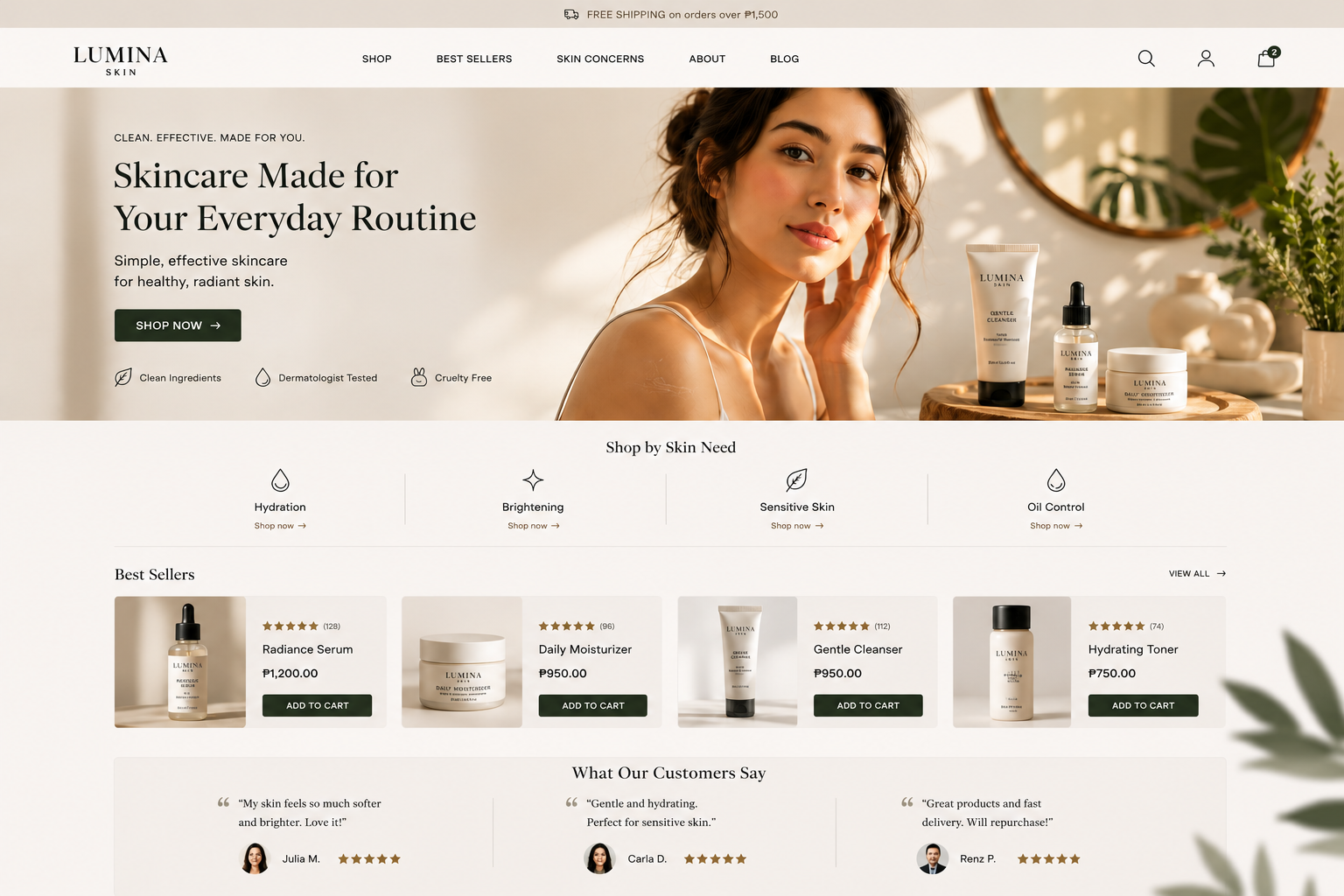
Your online store theme helps bring these elements together while keeping your brand and products front and centre. With 50+ EasyStore themes to choose from, you can start with a layout that fits your business and customise it to your brand.
The goal: Help customers understand your store and know where to start within a few seconds.
2. Make Products Easy to Find
Imagine a fashion store selling 100 products. Putting everything into one long product page makes browsing harder. Instead, organise products into useful categories such as:
New Arrivals | Dresses | Tops | Bottoms | Accessories
A shoe brand could organise products into:
Men | Women | Sneakers | Sandals | Formal Shoes | New Arrivals
Organise it around how your customers shop.
This is where your theme and navigation become practical tools, not just design choices.
The goal: Help customers get from the homepage to the product they want with as little searching as possible.
3. Let Your Products Do the Selling
Your customers can't physically touch or try your products online. Your product page therefore has a big job to do.
A strong product page should answer the questions customers may have before buying:
- What does it look like?
- What are its key benefits or features?
- How much does it cost?
- What sizes, colours or variations are available?
- When will it arrive?
- Can I return or exchange it?
- What do other customers think?
For example, a clothing store shouldn't rely on one product photo. Show the product from different angles, include close-up details, and provide a clear size guide.
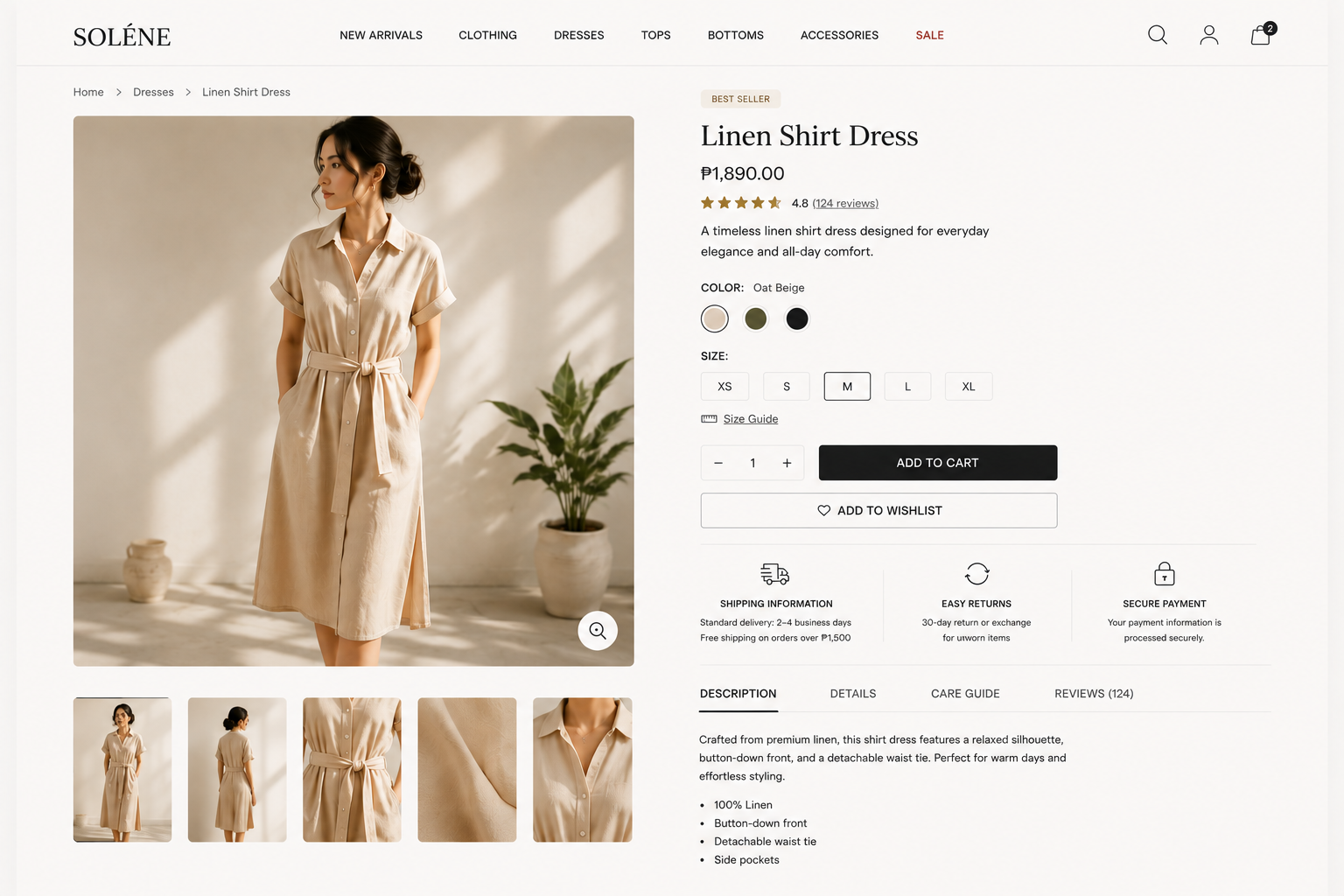
The goal: Give customers enough information to make a buying decision without having to message you for every detail.
4. Build Trust Before Asking for the Sale
A customer may like your product but still hesitate to buy if your store doesn't feel trustworthy.
This matters even more for smaller businesses that customers may be discovering for the first time.
Include trust signals such as:
Customer reviews and ratings
Clear contact information
Shipping and return information
Secure payment options
Consistent branding and product photography
Think about your own shopping behaviour. Would you feel comfortable entering your payment details into a store that has no contact information, unclear delivery details or poor-quality product images?
Your website doesn't need to look expensive. It needs to look credible.
The goal: Remove the questions and doubts that can stop a customer from buying.
5. Design for Mobile First
For Philippine businesses, mobile experience isn't something you can treat as an afterthought.
The Philippines had 98 million internet users at the end of 2025, with internet penetration reaching 83.8% of the population.
And for many customers discovering products through social media, the journey can look like this:
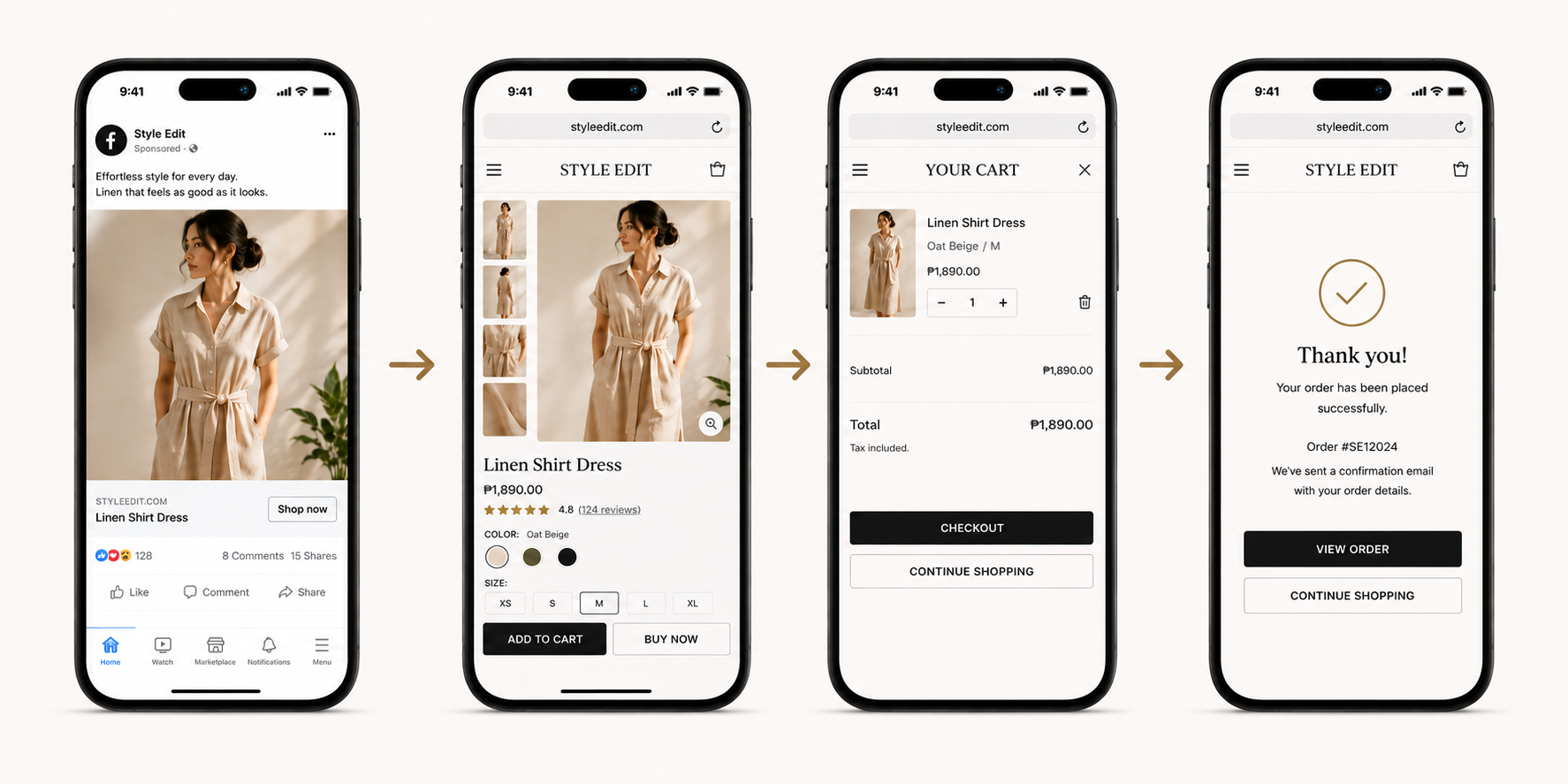
So don't judge a theme only by how it looks on a desktop.
Open your store on your phone and check:
- Is the menu easy to use?
- Are product images clear?
- Can customers find categories quickly?
- Are buttons easy to tap?
- Is product information easy to read?
- Can customers move smoothly towards checkout?
EasyStore lets merchants preview and customise themes for their online store, while newer themes provide flexible sections and blocks that can be rearranged without coding.
The goal: Make the shopping experience just as easy on a phone as it is on a desktop.
6. Make Checkout Simple
You can get everything else right and still lose the sale at checkout.
According to Baymard Institute's latest research, the average ecommerce cart abandonment rate is around 70%. Not all of those abandoned carts are preventable — some shoppers are simply browsing or comparing prices — but Baymard estimates that better checkout design alone could increase conversion rates by an average of 35% for a large ecommerce site.
The lesson is simple: don't make customers work harder than necessary to place an order.
Make important information clear before checkout, including shipping costs, available payment methods and delivery information. Keep the checkout process straightforward and avoid unnecessary steps or form fields.
For Philippine shoppers, offering familiar payment options can also make the experience more convenient.
The goal: Once a customer decides to buy, make it easy for them to finish the purchase.
Build a Store That Helps Customers Buy
A high-converting online store isn't about having the fanciest design. It's about creating a clear, trustworthy and easy shopping experience from the moment customers arrive to the moment they complete their purchase.
With 50+ EasyStore themes to choose from, you can start with a design that fits your business and customise it to your brand — then focus on what matters most: making it easier for customers to find, trust and buy your products.
Ready to build your online store? Explore EasyStore's 50+ themes and create a store designed to turn visitors into customers.